
/mcp-ui — forms from inputSchema, inline results, no separate frontend. Templates cover ClawQL search, memory_*, cache, and audit. Source: docs/mcp/mcp-ui.md. Related: mcp-api-adapter · Protocol Fabric · QR stream (8th, planned).
title: /mcp-ui — Swagger UI for MCP (HTMX / HATEOAS)
/mcp-ui — Swagger UI for MCP (HTMX / HATEOAS)
Status: v0 shipped · August 2026 · 7th surface of mcp-api-adapter
Path: GET /mcp-ui (adapter HTTP process)
Depends on: ListTools + tool inputSchema (same catalog as /docs and /graphiql)
Implementation: packages/mcp-api-adapter/src/mcp-ui-*.ts — catalog page + execute fragment, form UX (required/optional/defaults/Advanced), templates for search / memory_* / cache / audit. Deferred: nested object/array UIs, file upload/IDP, SSE progress, agent-generated UIs, ATR scoping.
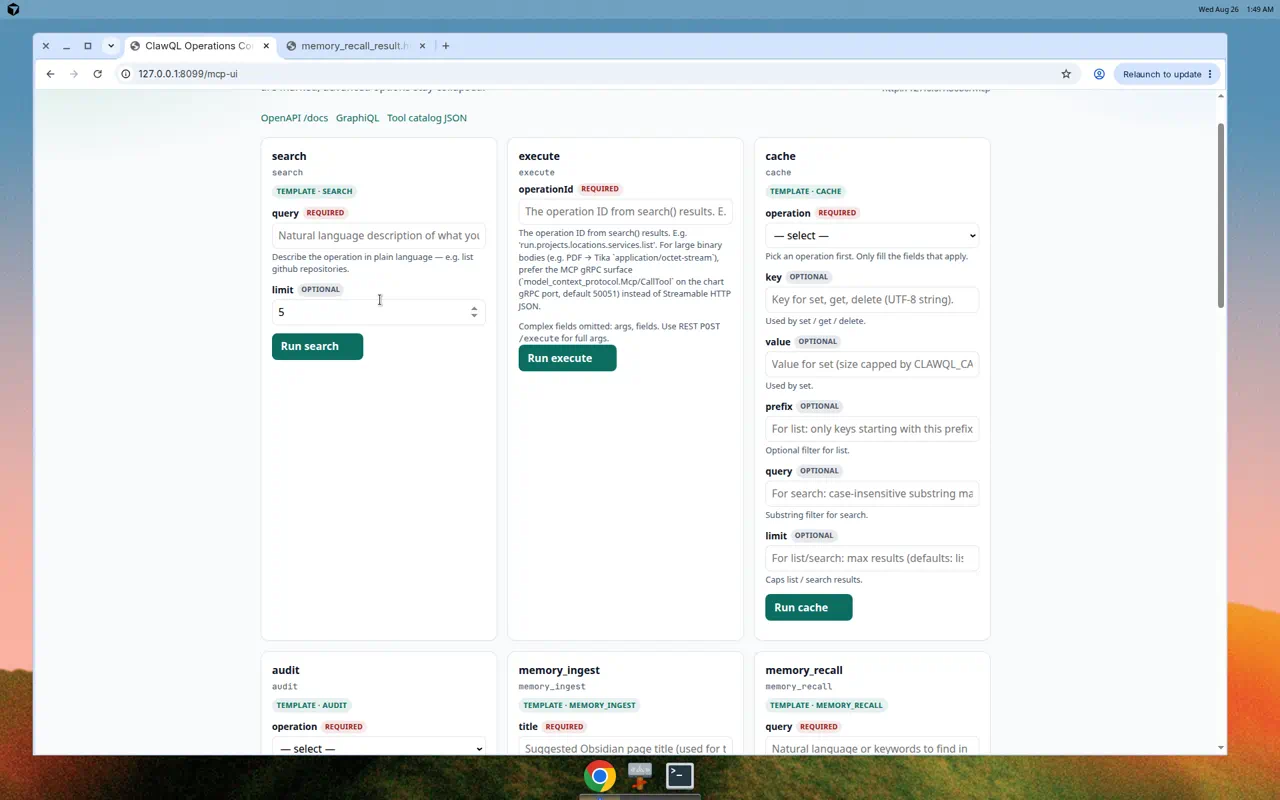
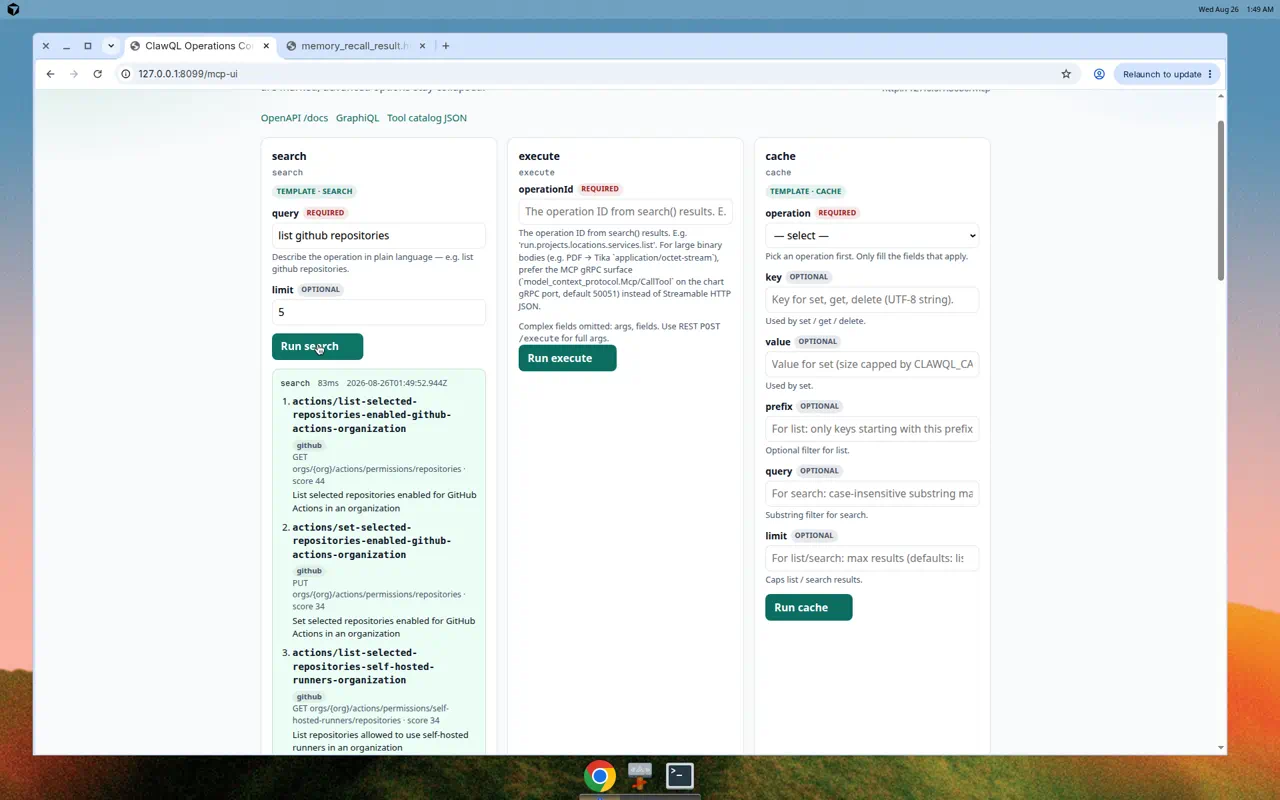
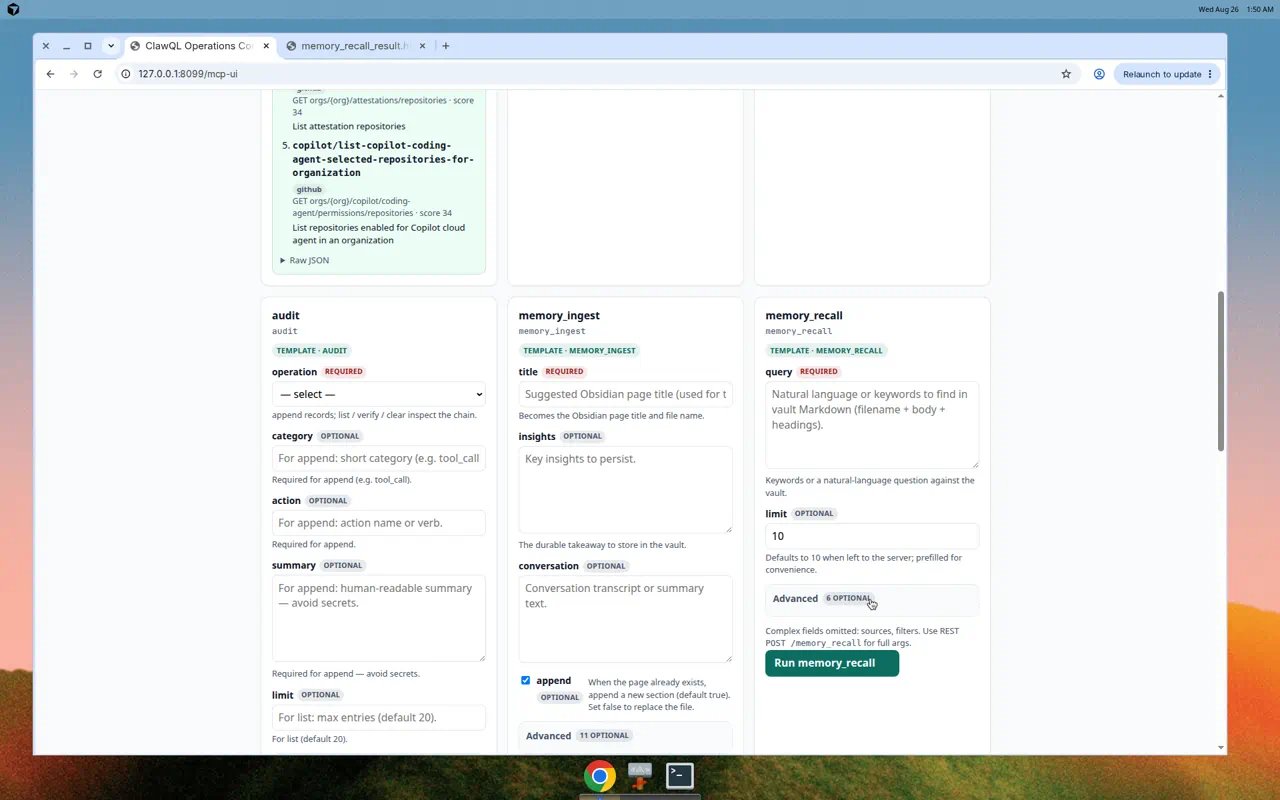
Screenshots
Live ClawQL Operations Console (mcp-api-adapter pointed at ClawQL Core):
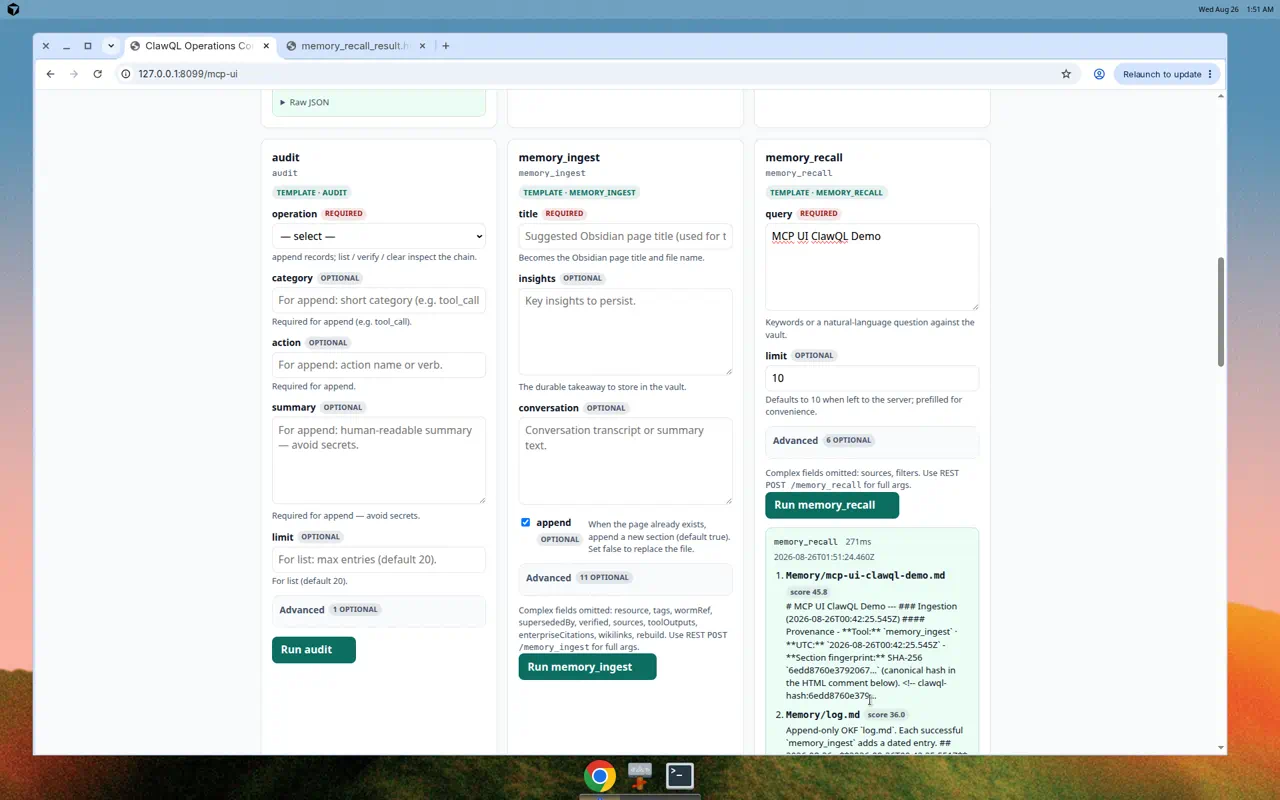
1. What this is
/mcp-ui is the Swagger UI for MCP: an auto-scaffolded, browser-navigable playground that ships inside mcp-api-adapter. Point the adapter at any MCP server; open /mcp-ui; every tool appears as a card with a form generated from its inputSchema. Submit runs the tool; the result renders inline. No separate playground product, no React SPA, no build step — server-rendered HTML with HTMX for interactivity.
Any API / CLI / gRPC / WebSocket
         │
    ClawQL Core (indexes → MCP tools)
         │
    mcp-api-adapter
         │
    GET /mcp-ui  — interactive forms for every tool
                   generated from inputSchema
Swagger made REST explorable in a browser. /mcp-ui makes any API ClawQL has turned into MCP explorable the same way — regardless of the original protocol.
2. Why not the existing MCP UIs
External playgrounds (MCP Playground, MCP Explorer, Chrome extensions) and MCP-UI / MCP Apps (SEP-1865) solve a different problem: you point a separate host at an MCP server, or the server delivers rich ui:// resources into an MCP host iframe.
What nobody ships today:
| Existing pattern | Gap |
|---|---|
| Standalone playground site / extension | User must go somewhere else or install something else |
| SEP-1865 MCP Apps | Server authors build UI resources; not auto from inputSchema |
Swagger at /docs |
JSON API explorer — not a human-first form catalog for MCP |
/mcp-ui is embedded, zero-config, and automatic — the same way /docs appears when you run the adapter. That is the differentiation.
3. Surface contract
3.1 Routes
| Method / path | Role |
|---|---|
GET /mcp-ui |
Full tool catalog playground (HTML) |
GET /mcp-ui/tools/\{toolName\} |
Optional deep-link to one tool card |
POST /mcp-ui/execute/\{toolName\} |
HTMX form post → tool invoke → HTML fragment result |
GET /mcp-ui/partials/catalog |
Optional HTMX refresh of the card list after ListTools refresh |
Disable with --no-mcp-ui. Override path with --mcp-ui-path / MCP_API_ADAPTER_MCP_UI_PATH (default /mcp-ui).
Auth: same API key gate as /docs and /graphiql when configured.
3.2 Catalog → form mapping
One inputSchema, three representations already exist (OpenAPI, GraphQL, REST). /mcp-ui is the fourth:
| JSON Schema | HTML control |
|---|---|
string |
<input type="text"> |
string + format: uri / email |
matching input type when safe |
number / integer |
<input type="number"> |
boolean |
checkbox |
enum |
<select> |
object |
expandable <fieldset> (nested properties) |
array |
add/remove row controls |
| required | required attribute + visual marker |
description |
help text under the field |
Unknown or awkward schemas fall back to a JSON textarea with the raw arguments object (same escape hatch idea as GraphQL callTool).
3.3 HTMX / HATEOAS shape
GET /mcp-ui → renders the tool catalog as a page
  └─ one card per tool
       ├─ name + description
       ├─ form fields from inputSchema
       └─ Submit → hx-post="/mcp-ui/execute/{toolName}"
                → hx-target="#result-{toolName}"
                → result fragment + next-action links
Example result fragment (illustrative):
<div id="result-memory_recall">
  <p>Found 3 notes matching "escrow non-compete"</p>
  <ul>
    <li>
      MAT-2401 — Escrow 12%, NC 24mo
      <button
        hx-post="/mcp-ui/execute/memory_ingest"
        hx-vals='{"title":"MAT-2401 follow-up"}'
        hx-target="#result-memory_ingest"
      >
        Ingest finding
      </button>
    </li>
  </ul>
  <a hx-get="/mcp-ui/tools/memory_recall" hx-target="#card-memory_recall">
    Search again
  </a>
</div>
HATEOAS here means next actions travel with the response — not a separate schema the human must memorize. MCP tool discovery is already hypermedia for agents; /mcp-ui expresses the same idea in HTML browsers already understand.
4. ClawQL chain (the real product story)
Every existing MCP UI assumes an MCP server already exists. ClawQL + /mcp-ui closes the loop:
- Ingest any REST / GraphQL / gRPC / CLI / WebSocket source into ClawQL Core.
- Expose the resulting tools through
mcp-api-adapter. - Explore every operation in a browser at
/mcp-ui— forms, buttons, inline results.
A new teammate can open one URL and call Salesforce, GitHub, internal gRPC, and legacy REST through the same interface — without learning each protocol or installing Postman collections.
5. Implementation notes (draft)
- Templating: server-side HTML only (no SPA). Prefer a small Effect-friendly render helper in
packages/mcp-api-adapter— no React/Vite dependency in the adapter process. - HTMX: load from a pinned CDN or vendored static asset under
/mcp-ui/assets/htmx.min.js. - Reuse: form field generation should share schema-walk helpers with OpenAPI/GraphQL builders where practical (one walk, multiple emitters).
- Safety: HTML-escape all tool names, descriptions, and result text. Never eval result content as HTML unless explicitly marked safe structured content later.
- Streaming: v1 is request/response fragments. SSE progress for long tools can reuse Streamable HTTP infrastructure in a later revision.
- Proof: clawql-payments
/credits/*already demonstrates HTMX fragment UX inside ClawQL — generalize that pattern to arbitrary MCP catalogs.
5.1 Effect-TS
Render and execute paths stay Effect-based inside the adapter package; Express (or Node http) handlers remain thin façades that run*Effect at the host boundary — same rule as the rest of ClawQL.
6. Non-goals (v1)
| Non-goal | Why |
|---|---|
| Full SEP-1865 MCP Apps host | Different problem (server-authored UI resources) |
Replacing Swagger /docs |
/docs stays for OpenAPI clients |
| Pixel-perfect design system | Utility HTML first; theme later |
| Multi-server Desktop config matrix | One upstream per adapter process |
| Untrusted HTML from tool results | Escape by default |
7. Acceptance (draft)
mcp-api-adapter --stdio -- <server>→GET /mcp-uilists every tool fromListTools.- Each tool card’s form fields match top-level
inputSchemaproperties (with JSON fallback). - Submit invokes the same call path as
POST /\{toolName\}and renders a result fragment. - With API key set,
/mcp-uirequires the same auth as/docs. --no-mcp-uiremoves the surface;/docsand/graphiqlstill work.
8. Relationship to other surfaces
| Surface | Audience | Path / bind |
|---|---|---|
| OpenAPI | Machines + Swagger | /docs |
| GraphQL | GraphQL clients + GraphiQL | /graphiql |
| Streamable HTTP | IDE / MCP SDK | /mcp |
| gRPC | Mesh / production | :50051 |
| gen-cli | Bash / CI | generated disk CLI |
| WebSocket | Long-lived clients / DOs | /ws |
| QR (planned) | Air-gap optical | physical channel |
/mcp-ui |
Humans in a browser | /mcp-ui |
Further reading
- User guide:
mcp-api-adapter.md - Design:
../design/mcp-api-adapter.md - Essay draft:
../gtm/pragmaticvectors/mcp-api-adapter.md - Protocol Fabric:
protocol-fabric.md - QR (8th surface, planned):
../streams/clawql-qr-stream-transport.md
/mcp-ui · August 2026 · mcp-api-adapter 7th surface