
Source: This page and
docs/case_studies/cross-thread-vault-recall-cuckoo-filters.md
are kept in sync; figures below are served from
/public/case-studies/cross-thread-vault-recall/.
Source: This page and docs/case_studies/cross-thread-vault-recall-cuckoo-filters.md are kept in sync; figures below are served from /public/case-studies/cross-thread-vault-recall/.
Case study: cross-thread recall with Cuckoo / hybrid memory
This case study shows what happens when you ask an assistant about plans that exist in vault notes but haven't landed in git yet. The concrete example is Cuckoo filters and hybrid memory.db work discussed in vault notes before equivalent code or docs existed in the tree. A third beat in the same workflow: after memory_recall synthesizes the plan, search() + execute() on the bundled GitHub API can file tracking issues from that context — no manual copy-paste into github.com. Screenshots are from a real vault and Cursor sessions (April 2026).
1. The problem: conversation context is ephemeral
Assistants are bounded by context windows and session boundaries. A detailed plan from last week in another chat is gone from the model's view unless you paste it again, it lives in git, or it was persisted somewhere the toolchain can retrieve. That's how the system works by default — the question is whether the toolchain routes around it.
2. What the repo alone can answer
User question (paraphrased): "What are we doing with Cuckoo filters in this project?"
When the assistant searches only the current repository and dependency manifests, it may correctly report: no references to "cuckoo," no filter library wired in, no design doc checked in yet — and distinguish that from generic "filters" used for observability or tracing.
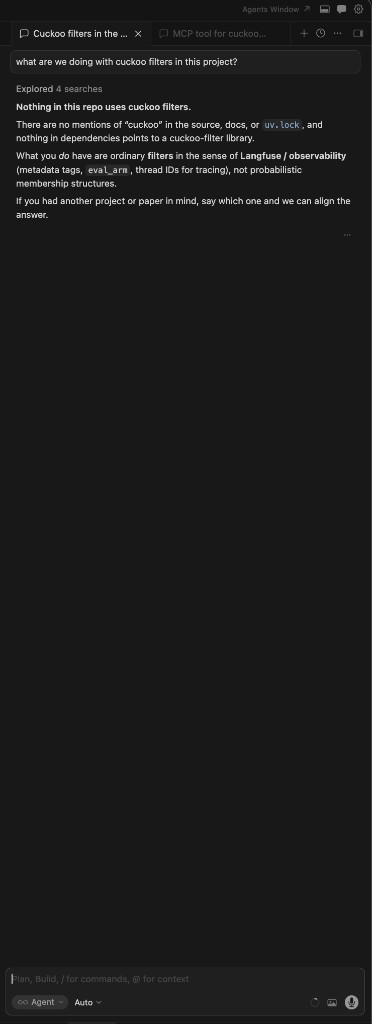
That answer is accurate for the repo. If the real plan lives in vault notes from earlier conversations, a repo-only search won't find it — and won't tell you it exists elsewhere.
3. What a week of memory_ingest can look like (Obsidian graph)
When you memory_ingest summaries of sessions — including chats with other assistants — into one Obsidian vault, the graph view becomes a map of topics, links, and hubs. After roughly one week of steady ingest, a vault can show dense clusters (hybrid memory, gRPC, benchmarks, GitHub issues, case studies) without hand-maintaining every edge.
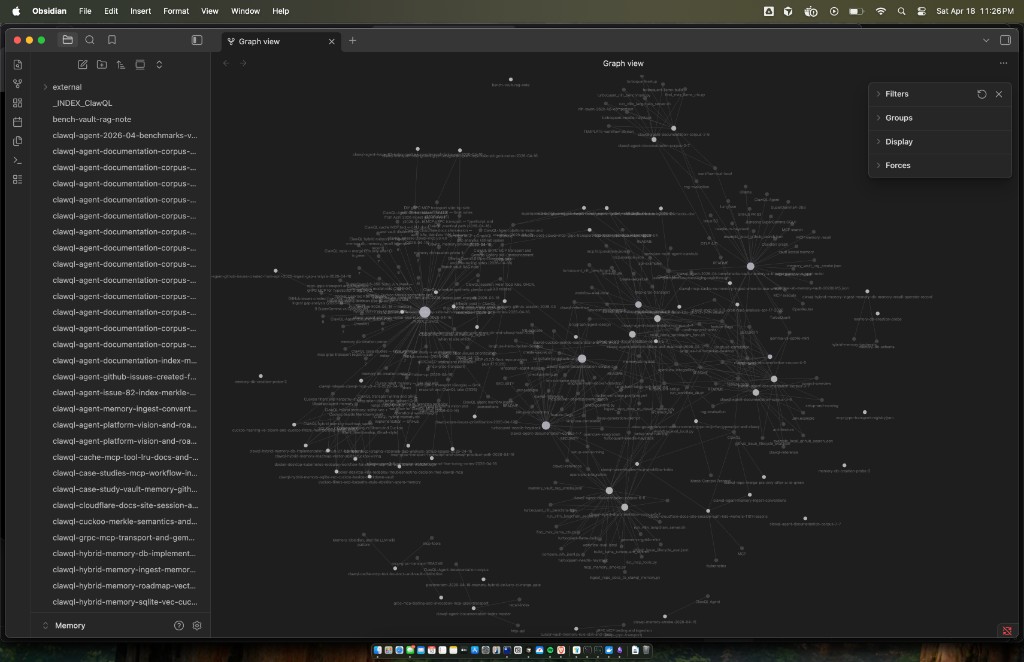
Typical filenames in such a vault include roadmap notes, _INDEX_* provider hubs, and cross-linked architecture pages. The graph reflects [[wikilinks]] and backlink structure that both Obsidian and ClawQL recall can traverse.
4. memory_recall() surfacing vault-only plans
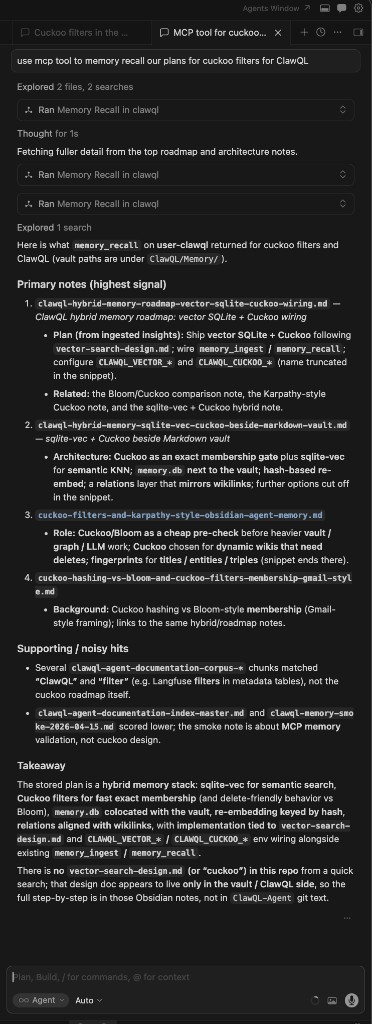
Same question, but the assistant uses ClawQL MCP memory_recall — and optionally a second pass with a narrower query after seeing titles.
The tool returns ranked notes from CLAWQL_OBSIDIAN_VAULT_PATH, optionally using graph depth (maxDepth) so linked notes participate alongside raw keyword hits. For Cuckoo-related work, recall may surface:
- hybrid
sqlite-vec+ Cuckoo wiring beside the Markdown vault - Merkle / membership semantics
- env toggles like
CLAWQL_CUCKOO_*/CLAWQL_MERKLE_*as planned or in-flight configuration - comparisons (Bloom vs Cuckoo, "Karpathy-style" agent memory sketches)
The assistant can then synthesize an answer that matches your roadmap language — even when that roadmap isn't yet represented as files in main.
5. Follow-up: search + execute to create GitHub issues
Same session, new user request (paraphrased): "Use ClawQL to create the issues that capture this work."
Once memory_recall has returned vault roadmaps, the assistant holds a synthesized description of the hybrid-memory effort — Cuckoo membership layer, sqlite-vec / embeddings, memory.db schema, MCP env wiring (CLAWQL_VECTOR_*, CLAWQL_CUCKOO_*), and so on. The next step uses the core ClawQL surface against OpenAPI-backed providers:
search— find the GitHub REST operation ids (e.g. issue create / update) and required path/body fields.execute— call those operations with a validCLAWQL_GITHUB_TOKEN(or PAT) on the MCP process.
In practice the assistant created an epic first, then child issues, then updated the epic body to link children — mirroring what you'd click through in the UI, but driven by the recalled plan.
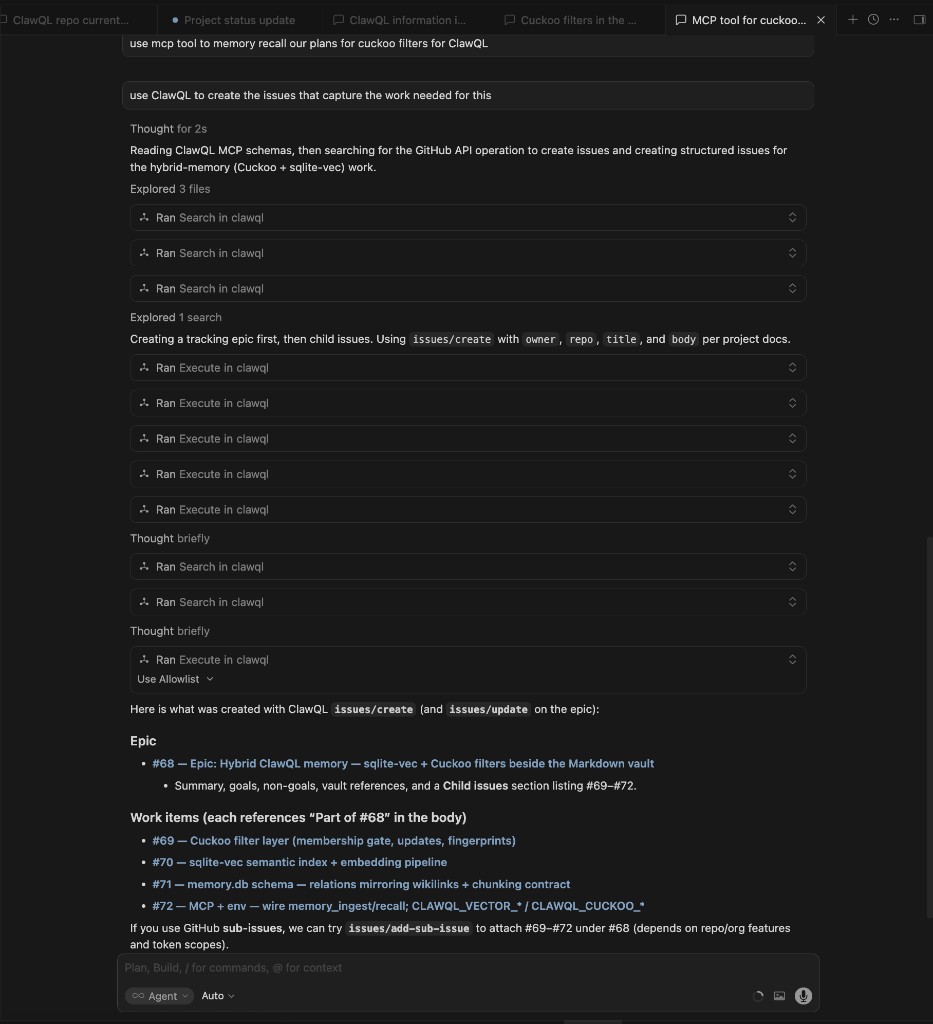
Example outcome in this repository (Apr 2026): epic #68 and work items #69–72. Numbers may change in other forks; the pattern is recall → synthesize → search / execute.
6. Vault graph: ingest, wikilinks, and recall
| Mechanism | Role |
|---|---|
memory_ingest | Writes Markdown under the vault; supports structured insights, optional conversation capture, toolOutputs, and wikilinks so new notes link to related pages |
| Frontmatter + provenance | Ingest sections can carry provenance metadata so you know what was captured and when |
[[wikilinks]] | Becomes Obsidian's graph; memory_recall can use link hops (maxDepth) so recall is not single-file grep |
| Tags in prose | Consistent tagging in insights (see project skill for vault memory) so later query terms hit the right theme clusters |
| Optional sidecars | With hybrid memory enabled, vector stores and Cuckoo-style membership checks can narrow candidate chunks before the model sees them |
cache() is for ephemeral session scratch. memory_ingest is for durable narrative you want recall to find next month.
7. Session workflows: pause, summarize, resume
A practical loop:
- While working, use the repo and tests as usual.
- Before you context-switch, run
memory_ingestwith a stable title (append-friendly) summarizing decisions, open questions, and links to issues or PRs. - When you return in any thread, run
memory_recallwith a concrete query (e.g. "Cuckoo filter hybrid memory sqlite vec") and tunelimit/maxDepth. - The assistant combines recalled vault text with current repo state (
git, new PRs) and avoids contradicting either. - With
CLAWQL_GITHUB_TOKENon the MCP process, usesearch/executeso the synthesized plan becomes GitHub issues (epic + children), as in §5.
That's how you recover cross-thread intent without pasting megabytes of old chat.
8. Token and relevance
Returning the whole vault would be expensive and noisy. ClawQL's recall path returns topically relevant material (and graph-neighbor context when configured), so the assistant receives enough of the right pages. The win is precision of context. For rough sizing, the repo's benchmark notes use ceil(bytes / 4) token estimates; the relevant number is how much of what comes back actually pertains to the question.
9. Reproduction checklist
- Install ClawQL MCP and set
CLAWQL_OBSIDIAN_VAULT_PATHto an Obsidian vault (seememory-obsidian.md). - Ingest at least one roadmap note (via chat or automation) that only exists in the vault — a design not yet in git.
- In a fresh chat with no pasted history, ask a question that only that note answers.
- Compare repo-only search vs
memory_recall— you should see the same pattern as this case study. - (Optional) With
CLAWQL_GITHUB_TOKENset on the MCP process, ask the assistant tosearch/executeGitHub issue operations so the recalled plan becomes tracked work on the repo.
10. References
docs/mcp/mcp-tools.md—memory_ingest,memory_recall,cachedocs/memory/memory-obsidian.md— vault layout, hybrid DBdocs/integrations/cursor-vault-memory.md— Cursor + vault workflowdocs/case_studies/README.md— other case studies
© Copyright 2026. All rights reserved. · ClawQL on GitHub